
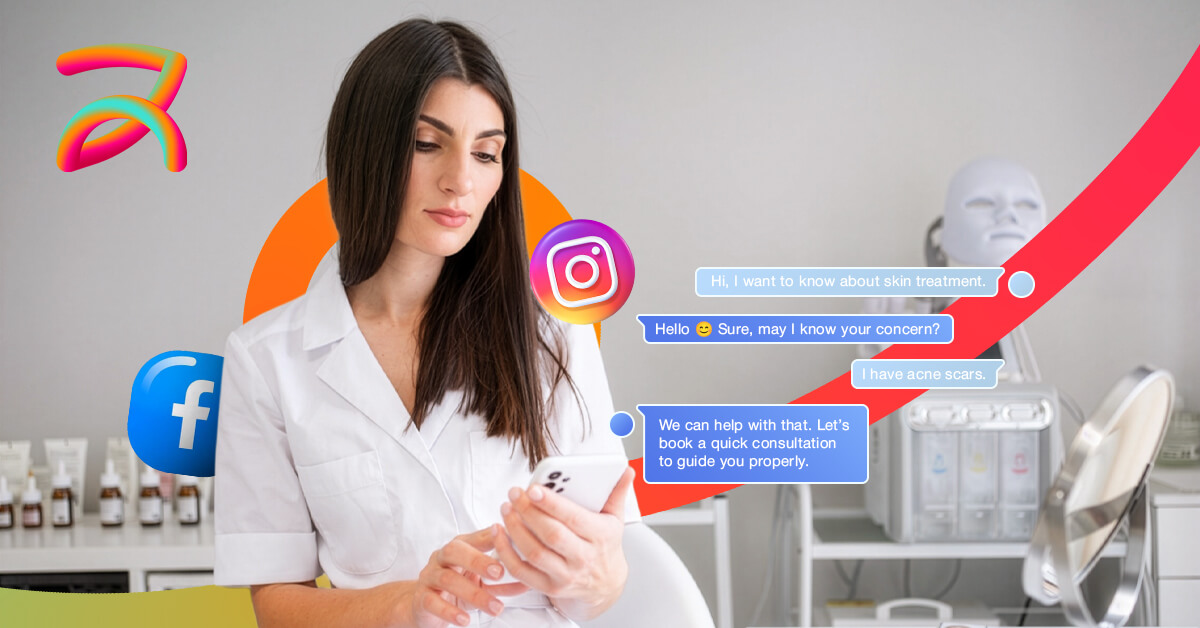
Facebook Messenger don’t convert to cosmetic surgery appointments because these practices respond too slowly (taking hours instead of 5 minutes), prospects use Messenger casually without serious booking intent filtering qualification, conversations lack urgency since prospects aren’t ready to commit publicly, staff miss messages across Facebook inbox and Messenger, and practices don’t transition from casual chat to formal booking systems fast enough before momentum dies for elective procedures like breast augmentation, rhinoplasty, liposuction, tummy tuck, and mommy makeover consultations.
Facebook Messenger generates initial interest through low-pressure conversations. But that same casualness creates booking friction.
With more than 5 years of experience in cosmetic surgery social media management, we’ve discovered that consistent testing and optimization are the key drivers behind scalable growth for brands.
In this article, you’ll learn:
- Messenger’s casual chat interface kills cosmetic surgery bookings because users browse without commitment unlike formal phone/email channels
- Response speed under 5 minutes converts 40% vs. 12% at 30+ minutes on platform where users expect instant texting-style replies
- The 3-message booking framework qualifies intent, answers briefly, sends booking link before momentum dies and prospects ghost
- Automated 30-day Messenger follow-up sequences convert the 75% of prospects needing multiple touches before consultation booking
- Facebook native appointments plus Messenger reminders reduce cosmetic surgery consultation no-shows from 35% to under 12%
Why Facebook Messenger Inquiries Don’t Convert to Booked Cosmetic Surgery Consultations
| Conversion Barrier | What’s Happening | Impact on Bookings | Quick Fix |
| Slow response time | Answering 2+ hours later | 70% drop in conversion vs. 5-minute response | Messenger quick replies + staff alerts |
| Casual conversation tone | Friendly chat without booking direction | Prospects browse forever, never commit | 3-message booking framework |
| No qualification process | Can’t separate serious prospects from browsers | Wasted time on low-intent inquiries | Ask budget/timeline questions immediately |
| Missing messages | Split between Page inbox and Messenger inbox | Lost leads from unseen messages | Unified Meta Business Suite inbox |
| No follow-up system | One response then silence | 75% of leads need 5+ touches | Automated Messenger sequence |
Why do Facebook Messenger conversations rarely turn into booked consultations?
Facebook Messenger conversations don’t turn into consultations because the platform’s casual, social nature creates low-commitment browsing behavior rather than serious booking intent, practices respond too slowly (hours vs. minutes) missing the critical engagement window, and prospects messaging multiple surgeons simultaneously ghost most conversations, requiring immediate response systems and qualification frameworks that separate serious prospects from tire-kickers.
According to appointment booking research, customers are more likely to book services when the process is hassle-free, but Facebook Messenger’s chat interface doesn’t signal the formality needed for cosmetic surgery decisions involving significant financial investment and medical procedures.
Messenger Feels Too Casual for Surgery Decisions
The platform’s informal chat interface works against big commitments.
People use Messenger for casual conversations with friends. That mindset carries over when messaging surgeons, creating psychological distance from the seriousness of booking surgery.
- Messenger = casual browsing and comparison shopping
- Phone/email = serious inquiry mode ready for commitment
- Move conversations to phone within 2-3 messages
- Create urgency: “Let me call you to explain options”
Response Speed Matters More on Messenger
Messenger users expect instant responses like texting friends.
When you respond in 30 minutes or 2 hours, prospects assume you’re not monitoring messages actively. They move on to surgeons who answered faster.
- Respond under 5 minutes during business hours
- Set up Messenger auto-reply after hours with booking link
- Use quick replies for common questions
- Assign staff to monitor Messenger exclusively
Messages Get Lost Between Multiple Inboxes
Facebook splits messages between Page inbox and Messenger inbox confusingly.
From more than 5 years of experience, we’ve discovered that practices missing 30-40% of inquiries because they only check one inbox while messages land in the other, causing prospects to feel ignored when they actually sent messages.
- Use Meta Business Suite to consolidate all messages
- Turn on notifications for both Page and Messenger
- Check both inboxes daily until consolidated
- Consider ManyChat or chatbot to never miss messages
How fast should cosmetic surgeons respond to Facebook Messenger inquiries?
Cosmetic surgeons should respond to Facebook Messenger inquiries within 5 minutes to maximize conversion, as research shows automated reminders and quick responses dramatically reduce no-shows and improve booking rates, with Messenger users expecting instant responses similar to texting friends rather than traditional email timelines that take hours or days.
After testing different response times versus consultation booking rates, the results show that practices responding under 5 minutes convert at 40% while those waiting 30+ minutes see conversion rates drop below 12% for cosmetic surgery inquiries.
Setting Up Messenger Quick Replies
Facebook’s quick reply feature sends instant templated responses.
These aren’t robotic auto-responses—staff customizes them quickly for each prospect. They solve speed without losing personalization.
- Pricing template: “Hi [Name]! [Procedure] typically ranges $X-Y. Best next step is free consultation: [booking link]”
- Timeline template: “Great question! Are you actively planning surgery soon or gathering info for the future?”
- General inquiry: “Let’s schedule 15-minute consultation call this week: [link]”
Using Messenger Auto-Replies After Hours
Evening and weekend messages are the highest intent, don’t lose them overnight.
Set up auto-reply with a booking link so prospects can self-schedule even when staff isn’t monitoring Messenger actively.
- Auto-reply: “Thanks for messaging! We’ll respond by 9am tomorrow. Book consultation anytime: [24/7 link]”
- Include WhatsApp option: “Prefer WhatsApp? Message us: [link]”
- Offer virtual consultation: “Video consultation available if more convenient”
Why Messenger Needs Faster Response Than Instagram DMs
Messenger users expect even faster responses than Instagram.
Facebook Messenger feels more like texting than social media, creating higher expectations for immediate replies within minutes.
- Messenger expectation: Under 5 minutes
- Instagram DM expectation: Under 15 minutes
- Email expectation: Under 24 hours
- Prioritize Messenger for fastest response
Our expertise has been featured in top digital marketing magazines for delivering top-class cosmetic surgery messaging solutions to our clients.
What should Cosmetic Surgeons message on Facebook Messenger to actually Book Consultations?
Cosmetic surgeons should use a 3-message booking framework in Facebook Messenger:
- Message 1 qualifies intent (“Are you actively planning surgery or researching?”)
- Message 2 answers briefly then transitions to scheduling (“Best way to discuss is free consultation, does this week work?”)
- Message 3 sends a direct booking link with urgency (“Here’s my calendar: [URL]. Limited slots left!”)
This framework prevents endless educational conversations that waste time without booking.
During our 5 years of experience, we observed that practices answering questions endlessly on Messenger without pushing toward booking wastes 80% of their time on prospects who never convert, so we always prioritize qualification and booking direction within the first 3 messages.
The 3-Message Booking Framework
Goal: qualify, answer briefly, book within 3 messages.
Message 1: “Hi [Name]! Thanks for asking about [procedure]. Are you actively planning surgery soon or gathering information for the future?”
Message 2: “[2-3 sentence answer to their question]. The best way to get specific information for your situation is a free consultation. Do you have 20 minutes this week for a call or would you prefer coming in?”
Message 3: “Perfect! Here’s our booking link: [URL]. Choose whichever time works best. Looking forward to chatting soon!”
Questions That Qualify Serious Messenger Prospects
Not all Messenger inquiries deserve equal time investment.
- Timeline: “When are you hoping to schedule your procedure?”
- Budget reality: “Have you researched typical investment for [procedure]?” (then provide range)
- Readiness: “Are you ready to schedule a consultation this month?”
- Research stage: “Have you consulted with other surgeons yet?”
What Never to Say on Messenger
Certain responses kill conversion instantly even if true.
- Never say: “Send me your email and I’ll send info” (creates friction)
- Never say: “Call our office during business hours” (lazy—they’re messaging YOU)
- Never say: “Check our website for details” (why would they when competitor answers in chat?)
- Instead: Make next step ridiculously easy right in Messenger
🎯 How BUZZZ Can Help You?
If you want to transform Facebook Messenger from frustrating conversations into predictable consultation bookings filling your surgical calendar.
Get Your Free Social Conversion Strategy →How to stop Facebook Messenger leads from ghosting before booking consultations?
Stop Facebook Messenger leads from ghosting by implementing automated 30-day follow-up sequences through Messenger and WhatsApp, providing educational content about recovery and results, sharing relevant before-after transformations (with consent), addressing cost concerns with financing options, offering limited-time consultation incentives, and maintaining contact every 3-5 days until prospects either book consultations or opt out.
According to cosmetic surgery marketing research, patients rarely book after seeing a single message, with full-funnel strategies including retargeting, testimonials, and educational content delivering best ROI by nurturing prospects through their decision journey.
The 30-Day Messenger Follow-Up Sequence
Most prospects need multiple touches before committing to consultation.
- Day 1: Initial response + booking link
- Day 3: “Following up on [procedure] questions. Any concerns I can address?”
- Day 7: Share before-after: “Recent [procedure] patient with goals similar to yours”
- Day 14: Educational content: “Video explaining consultation process: [link]”
- Day 21: Social proof: “What patients say about their experience: [testimonial]”
- Day 30: Final push: “Holding consultation slot for you this week – interested?”
Using ManyChat for Automated Messenger Sequences
Manual follow-up doesn’t scale—automate with chatbot tools.
ManyChat and similar tools send automated Messenger sequences while feeling personal. They ensure no prospect falls through cracks.
- Set up automated sequences based on inquiry type
- Tag prospects by procedure interest (breast, face, body)
- Send different content based on their responses
- Move hot prospects to staff for personal conversation
When to Stop Following Up on Messenger
After 6-8 attempts over 90 days with zero response, archive.
- Stop after: 6-8 messages with no reply over 90 days
- Archive for future: They might return in 6-12 months
- Final message: “Reach out anytime you’re ready. Here’s our booking link: [URL]”
- Re-engage signal: If they react to your posts later, message again
For practices struggling with prospects who engage across multiple platforms but never book, understanding how multi-platform DMs break cosmetic surgery booking reveals why splitting attention across Facebook Messenger, Instagram DMs, and WhatsApp creates confusion that destroys conversion rates.
What booking systems work best for converting Facebook Messenger cosmetic surgery inquiries?
The best booking systems for Facebook Messenger inquiries use Facebook’s native booking feature integrated with Calendly, Acuity, or Square Appointments that lets prospects self-schedule consultations 24/7 directly from Messenger conversations, combined with automated confirmation messages, payment collection for consultation deposits, and reminder sequences sent via Messenger that reduce no-shows from 35% to under 12% for cosmetic surgery consultations.
According to Facebook booking system research, customers are more likely to book when the process is hassle-free, with automated reminders helping reduce no-shows and improving retention rates significantly when sent via platform prospects already use daily.
Setting Up Facebook’s Native Booking Feature
Facebook lets you accept appointments directly through Messenger.
In Meta Business Suite, enable appointment booking feature. Prospects can book without leaving Messenger, removing friction that kills conversions.
- Go to Appointments in Meta Business Suite
- Set your availability schedule and service offerings
- Enable manual or automatic appointment confirmation
- Connect to Google Calendar to avoid double-bookings
Using Third-Party Booking Tools with Messenger
Calendly and Acuity integrate seamlessly with Messenger.
Send booking links directly in Messenger conversations. Prospects click, choose time, book instantly—all without phone calls or back-and-forth scheduling.
- Calendly link in quick replies: “Book here: [calendly.com/yourname]”
- Embed booking in Messenger button: “Book Appointment” CTA
- Acuity for service-specific scheduling with different consultation types
- Square Appointments for payment collection at booking
Reducing No-Shows Through Messenger Reminders
Messenger reminders reduce no-shows better than email.
People check Messenger more frequently than email. Automated reminders through Messenger keep consultations top-of-mind.
- Day-before reminder: “Consultation tomorrow at 2pm! Looking forward to meeting you”
- Morning-of reminder: “See you in 3 hours! Here’s what to bring: [list]”
- 1-hour reminder: “On your way? Let us know if running late”
- Collect $50-100 deposit at booking to filter serious prospects
For cosmetic surgery practices wanting professional systems that convert Facebook Messenger inquiries systematically into booked consultations, expert social media management services for cosmetic surgery can implement automated Messenger sequences, quick reply systems, booking integrations, and follow-up frameworks that fill consultation calendars predictably.
For comprehensive social media strategies coordinating Facebook Messenger alongside Instagram DMs, WhatsApp, and other platforms into unified booking systems, professional social media management services can build complete conversion funnels while you focus on surgery and patient care.
Final Thoughts
Facebook Messenger generates cosmetic surgery interest through casual conversations, but converting those chats into booked consultations requires speed (under 5 minutes), qualification systems (separating browsers from serious prospects), transition strategies (moving to phone/booking links quickly), automated follow-up (30-day nurture sequences), and frictionless booking (one-click Messenger scheduling).
Most cosmetic surgery practices struggle with Facebook Messenger because they respond too slowly, treat it like casual social chatting, lack qualification frameworks, don’t follow up systematically, or make booking too complicated. Building profitable Messenger conversion systems requires platform expertise and automation.
🎯 How BUZZZ Can Help You?
If you want to transform Facebook Messenger from frustrating conversations into predictable consultation bookings filling your surgical calendar.
Get Your Free Social Conversion Strategy →